Latest Posts :

Powered By PinoyXpert | Customized By: PH News Update

Showing posts with label Internet Tools. Show all posts

Surf Anonymously Secure your Internet Hide you Computer IP Address | HideMyAss Pro VPN

Written By Admin on Tuesday, August 27, 2013 | 1:19 PM

Connect to our VPN service to anonymously encrypt your internet activity from prying eyes. All applications on your computer that utilize your internet connection will become anonymous with just a click of a button; no technical experience is required due to our easy to use VPN software. Enjoy internet freedom and anonymity knowing that your sensitive web traffic is securely hidden behind 54'000+ IP addresses located in 111 locations in 61 countries.

WHAT YOU GET:

  • 446 VPN servers in 61 countries
  • Hide behind 54'000+ IP addresses
  • Free HMA! Pro VPN software
  • Supports PC, Mac, phone, tablets
  • Unlimited data transfer
  • 30 day money back guarantee

How to Uncapped or Unlimited Bandwidth Limit MyBro/PLDT/SMARTBRO

Written By Admin on Saturday, May 18, 2013 | 10:39 AM

Uncapped:
Reset Account Bandwidth Limit without using more than one computer
1.)-Connect one computer to the router via lan cable
-Open the router's administration tool "http://192.168.1.1/" or "http://192.168.0.1/"(depended sa inyo router brand)


Sample : CD RKING Router - How to Setup CD R-king Router LO Series for Globe Wimax
-log in using your account or default router account .

2.)Open the internet Setup Tab
3.)locate "Dynamic ip(DHCP) Internet connection type
4.)Change the mac address clone section last column or number) kung wala mag lagay ka
pwede mo kunin yung mac ng PC mo at change yung dulo mac
5.) access this link "https://portalln.mybro.pldthome.com/login.php"(recommended po ang Firefox browser for faster responds)
6.)login to your account (service reference number/account number )na makikita sa inyo billing paper.
7.)wait po kayo ng 5min..para ma reconnect ulit sa internet.
8.)open po kayo ng cmd(type nyo po "ipconfig /release" and "ipconfig /renew")
9)done..enjoy your uncap bandwidth. (repeat again kong na abot nyo ulit ang 15gb limit.)
Note: Do this at your own risk! This tutorial is intended for educational purposes only do not use this for hacking or bypassing your network operators which is prohibited by the law.

How to Get Your LAN MAC Address

1. Type cmd on run command or in windows 7 Search
2. Type ipconfig/all
3. Find you LAN MAC


Note: Do this at your own risk! This tutorial is intended for educational purposes only do not use this for hacking or bypassing your network operators which is prohibited by the law.
How to Setup CD R-king Router LO Series for Globe Wimax

Connect your CD-R king Router
1. Go to your browser type the router IP 192.168.1.254  log in
User: admin
Pass:admin
or look at the back of your router for user and pass

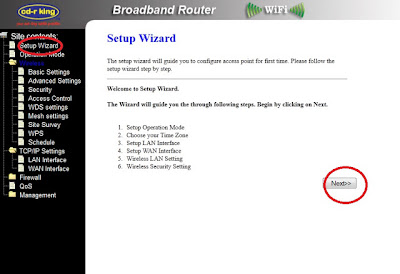
2.Go to Setup Wizard click Next.


3. Select Bridge the click Next.
4. Change the SSID.
5. Now on Wireless Setup Choose
Encryption: (WPA2 Mixed)
PreShared Key: (create your own)
6. Again Basic Setting  change SSID
7. Wireless Security Setup Follow below photo

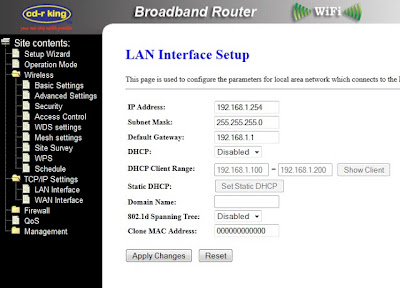
8.LAN Interface Setup Fallow this Config.

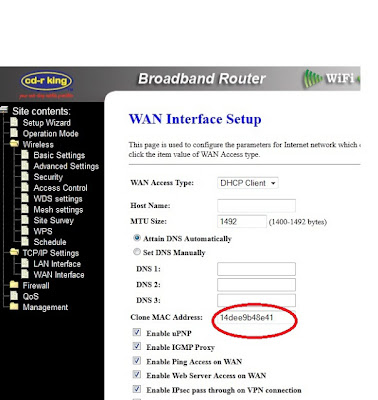
9.WAN Setup Clone the Mac check all Enable and put your Clone MAC Address.


 Follow this link on How to Get LAN MAC Address

NOTE: Do this at your own risk. If fails press the RESET Button on your router sometimes your IP is 169.

Note: Do this at your own risk! This tutorial is intended for educational purposes only do not use this for hacking or bypassing your network operators which is prohibited by the law.
How to CHANGE MAC Address Huawei Wimax BM622m PERMANENT

Written By Admin on Sunday, April 28, 2013 | 11:46 AM

This guide will show you how to connect your disconnected Huawei Wimax BM622m by replacing mac Address.

Ok here we go,


Step 1.
Open your browser and type 192.168.254.1 then Login as user.
Username: user
Password: 0SlO051O 

Step 2.
Paste this to your browser http://192.168.254.1/advanced/acl.html then check
"telnet" and Apply.

Step 3.
Click run and type "telnet 192.168.254.1" without quote

Step 4.
Login : Firefly
Password: $P4mb1h1r4N4m4nT0!!
sncfg dset WAN_MAC XX:XX:XX:XX:XX:XX
sncfg dset LAN_MAC XX:XX:XX:XX:XX:XX
sncfg commit
sncfg reload
reboot 

Step 5.
Copy your wan mac address and generate it using wimax pass gen
Download Pass Gen or WIMAX TOOL V6.5

Step 6.
Go to http://192.168.254.1/wimax/security.html apply user and pass generated.

Enjoy Guys if you have a question dont forget to Join to our Community

Internet Download Manager (IDM) 6.15 Beta 9 FULL VERSION

Written By Admin on Saturday, April 27, 2013 | 10:26 AM


What's new in version 6.15 Build 9?

(Released: Apr 25, 2013)
  • Updated extension for Google Chrome
  • Fixed bugs


Internet Download Manager (IDM) is a tool to increase download speeds by up to 5 times, resume and schedule downloads. Comprehensive error recovery and resume capability will restart broken or interrupted downloads due to lost connections, network problems, computer shutdowns, or unexpected power outages. Simple graphic user interface makes IDM user friendly and easy to use.Internet Download Manager has a smart download logic accelerator that features intelligent dynamic file segmentation and safe multipart 

Latest Huawei Wimax Tool V6.5 Full Version


Huawei Wimax tool for 622, 621, 625, 622i(2010-2011)


BACKUP YOUR MACS DATABASE BEFORE TESTING THE NEW VERSION

** there is no virus or anything that can harm or damage your computer.

** to those user cannot changed their mac / cant access telnet / and the device can change its mac address, make sure that you enable the telnet in your wimax . just login as ADMIN click ADVANCED -> ACL and CHECK the telnet under LAN and click apply

** for those user who stock in "setting profile security" its in your comp is the problem.try to install and run ccleaner so your system is clean.

How to CHANGE MAC Address Huawei Wimax BM622i 2011

Written By Admin on Wednesday, April 24, 2013 | 5:57 PM

This guide will show you how to connect again your disconnect Huawei BM622i 2011

eto po ay tut kung pano magchange mac sa bm622i 2011 package..di po ako papansin..try nyo muna bago kayo mag neagtive feedback ok.....ang problem lng dito kahit nka change mac na ako di pa din ngcoconect modem ko..di ko din mapasok admin sa gui..

1st po download nyo to...
DOWNLOAD HERE.

2nd: connect nyo bm622i nyo sa pc

3rd run nyo yung firmware upgrader pero wag nyo po i upgrade..yaan nyo lang nakaopen..

4th: go to>start>run>cmd tpos type nyo telnet then enter

5th: after type nang telnet type nyo " o 192.168.254.1 "(pakialis na lang po ng " "pag magttype)

6th: LOGIN: Firefly PASS: $P4mb1h1r4N4m4nT0!! then enter

7th: ATP>xiugai macdizhi XX:XX:XX:XX:XX:XX (yan po yung mac na ilalagay nyo)

How to CHANGE MAC Address Huawei Wimax BM622i 2011

This guide will show you how to connect again your disconnect Huawei BM622i 2011

1st po download nyo to...
DOWNLOAD HERE
2nd: connect nyo bm622i nyo sa pc
3rd run nyo yung firmware upgrader pero wag nyo po i upgrade..yaan nyo lang nakaopen..
4th: go to>start>run>cmd tpos type nyo telnet then enter
5th: after type nang telnet type nyo o 192.168.254.1

How to CHANGE MAC Address Huawei Wimax BM622i 2010

This guide will show you how to connect again your disconnected Huawei BM622i 2010

ito guys share ko lang sa mga newbies :D
sana makatulong sa inyo.

Login wimax
Passwordwimax820
ATPdiag set macaddr XXXXXXXXXXXX
set Lan mac address success
Lan mac address updated XXXXXXXXXXXX
set Lan Mac address Sucess
Wan mac address updated XXXXXXXXXXXX
ATP diag restore default

paki like na lang po thanks.

LEARN MORE HOW TO CHANGE MAC ADDRESS

How to CHANGE MAC Address Huawei Wimax BM622 2011

This guide will show you how to connect again your disconnect Huawei BM622 2011

        BM622 2011 CHANGE MAC

        1.PLUG YOUR MODEM IN TO THE COMPUTER W8 UNTIL CONNECTED TO YOUR PC
        2.ENABLE MUNA NATIN TELNET SA ADMIN..
        3.OPEN BM622 DECODER Download LINK
        4.OPEN BROWSER TYPE 192.168.1.1 (ENTER) LOGIN: ADMIN PASS: UNG NA GENERATED NG BM622 DECODER
        5.PAG PASOK NA SA ADMIN... PUNTA SA ACL TAPOS CHECK UNG TELNET SA LAN THEN APPLY.. (TELNET NA TAU)
        6.GO TO CMD TYPE TELNET 192.168.1.1 THEN ENTER
        7.LOGIN: Firefly PASS: $P4mb1h1r4N4m4nT0!! then enter
        ATP>display allmacaddr (show base mac )
        Current WAN Mac:XX:XX:XX:XX:XX:XX

Globe Wimax 2mbps Mac Address | Working Mac Adress for FREE

2-3 mbp

20:2B:C1:AA:9A:07
10:C6:1F:AB:6E:1C
40:4D:8E:CF:B6:5A
04:C0:6F:60:E4:FA
64:16:F0:00:B7:34
10:C6:1F:AB:5A:5C
20:2B:C1:E0:9B:AD
64:16:F0:C5:01:42
00:25:68:AC:E9:93
4C:54:99:6D:E8:73
10:C6:1F:AB:63:68
4C:54:99:6D:B1:21
20:2B:C1:AA:BF:59
40:4D:8E:AA:5B:2F
64:16:F0:00:B7:34
4C:54:99:6D:E0:8D
64:16:F0:C5:A2:F6

pili lang kayo dito :D
all tested po yan at working po!

Surf Anonymously Unblocking Websites and WiFi Protection SafeIP

Written By Admin on Friday, April 19, 2013 | 6:29 PM

Anonymous Web Surfing

Knowing your online privacy is maintained is priceless. Internet connection records containing personal information are collected and stored of from billions of Internet users around the world every day. Even with information is collected legally, it could inadvertently fall into the wrong hands and be used for tracking your online behavior, stealing your payment information, identity, or malicious purposes. SafeIP can be used for free to protect your Internet connection from such threats by concealing your location securing your Internet connection.

VPN for PC/Mac/Linux/Phone/Router

The SafeIP software application is for Windows, yet you can use the same IP protection service with any of our available locations to protect your other devices such as Mac, Linux, mobile phone, routher, or other device that supports the OpenVPN protocol. Purchase the Pro edition of SafeIP to protect up to 5 devices.

Unblocking Websites

Sites like Facebook, YouTube, Gmail, Twitter, and thousands of others are blocked by many schools, universities, offices, ISPs, or even countries. Even most of Google's services were blocked by China. SafeIP can be used to unblock any website, bypassing filters and firewalls, allowing for a free Internet. SafeIP uses anti-blocking measures to prevent the software itself from being blocked by any Internet Service Provider.

Speed Up your Internet Connection Using CONNECTIFY DISPATCH

Do you have multiple connection available in your area? And do you want to boost or Speed up your internet download and upload connection? Merge your connection into one super fast connection

"What if you could merge your home Internet connection with the free Wi-Fi from the coffee shop down the street AND with your phone's 4G connection to create a super-pipe with tons of additional bandwidth? That's what Connectify Dispatch does, perfectly."

Globe Free Load Tricks April 2013

Written By Admin on Sunday, April 14, 2013 | 2:38 PM

Just txt hcy to 2353 ganun lang me P10 load kna agad..pagnarecieve n ang load txt agad UNLICHAT OFF to 2353..subukan nyo bka working dn sainyo..
PWEDE DIN TO SA MGA TM USERS..TEXT NA PARA MAGKALOAD KA NG LIBRE..nka 50 load n aq jan


For more info : Visit and Join to our Community - PinoyArena.com

GLOBOOM v3 Bugging Tools for Globe Promo Registration

Written By Admin on Wednesday, April 3, 2013 | 12:43 PM


Share ko lang din po itong Bugging tools

credit sa gumawa nito galing talaga ng pinoy


Internet Download Manager Android for Cherry Mobile Flare

Written By Admin on Sunday, March 31, 2013 | 10:46 AM

This version is originally ADM (Android Download Manager).
Modified by CyclopSX

Features: 
  • accelerated download by using multithreading (3 parts)
  • interception of links from the browser and a clipboard
  • an icon of the program and loading progress in the notification panel
  • space reservation on a flash drive for the downloaded file
  • saving of files of different types in different folders
  • automatic definition file size after the addition of
  • a sound and vibration upon termination of loading
  • resume after disconnect or restart the program

Tutorial How to Unlock TM Sim

Make sure na wala na po kayong load or ubusin nyo muna ang load nyo
sa smart/tnt sim nyo bago nyo gawin ang kahit anung solusyon, as in yung check operator na talaga,kapag
nablock ulet, back to this phase then do the steps again

solution #1
kung may load ka pa ubusin mo lang load mo hanggang magreply si budoy na
you dont have enough load or ma check operator sim mo.
At
automatic disabled nanaman gprs ng sim mo,
kaya
mag papasa load ka nalang ng p2,
then text gprs on sa 211.

Tap Driver for ALL VPN's Like Hotspot Shiel VPN, OPEN VPN, PD-Proxy, Hex VPN, etc.

Written By Admin on Saturday, March 30, 2013 | 3:53 PM

If you are using VPN for the first time you need to have TAP driver installed.

Download the TAP Adapter Driver for All VPN's out there. :)

Download HERE

List of Opera Mini Handlers for Free Internet

Written By Admin on Friday, March 29, 2013 | 5:28 PM

Guys here are the list of Opera Mini Handlers

Enjoy :)

Operamini Modif Standart
Opera Mini Modif_204_en.jar
Opera Mini Modif 205en.jar
Opera Mini Modif 206_en.jar
Opera Mini Modif 311_en.jar

 
Copyright © 2011. PinoyXpert - All Rights Reserved
Proudly powered by Blogger