Latest Posts :

Powered By PinoyXpert | Customized By: PH News Update

How to Password Protect Any Folder Without Any Software

Written By Admin on Saturday, April 27, 2013 | 4:55 PM

In this tutorial i will show you interesting and useful trick to password protect folder without using any software using batch file programming. This trick will work on all windows platform (Win XP, Win 7). Follow below tutorial to learn this trick.

How To Lock Folder ?

  1. Open Notepad and Copy code given below into it.
cls
@ECHO OFF
title pinoyxpert.blogspot.com
if EXIST "Control Panel.{21EC2020-3AEA-1069-A2DD-08002B30309D}" goto UNLOCK
if NOT EXIST MyFolder goto MDMyFolder
:CONFIRM
echo Are you sure to lock this folder? (Y/N)
set/p "cho=>"
if %cho%==Y goto LOCK
if %cho%==y goto LOCK
if %cho%==n goto END
if %cho%==N goto END
echo Invalid choice.
goto CONFIRM
:LOCK
ren MyFolder "Control Panel.{21EC2020-3AEA-1069-A2DD-08002B30309D}"
attrib +h +s "Control Panel.{21EC2020-3AEA-1069-A2DD-08002B30309D}"
echo Folder locked
goto End
:UNLOCK
echo Enter password to Unlock Your Secure Folder
set/p "pass=>"
if NOT %pass%== pinoyxpert goto FAIL
attrib -h -s "Control Panel.{21EC2020-3AEA-1069-A2DD-08002B30309D}"
ren "Control Panel.{21EC2020-3AEA-1069-A2DD-08002B30309D}" MyFolder
echo Folder Unlocked successfully
goto End
:FAIL
echo Invalid password
goto end
:MDMyFolder
md MyFolder
echo MyFolder created successfully
goto End
:End
   2. Save the notepad file as lock.bat (.bat is must)
   3. Now double click on lock.bat and a new folder will be created with name MyFolder
   4. Copy all your data you want to protect in that New folder
   5. Now double click on lock.bat and when command promp appears Type Y and press enter.
   6. Now MyFolder will be hidden from you view, to access that folde double click on lock.bat
   7. It will ask for password enter your password and done. (Default password is pinoyxpert)

How to Block Facebook Site using simple Steps

  1. First download Facebook Blocker
  2. Extract the file and right click on Facebook Blocker.exe and run it as administator (Important)
  3. Press 1 in order to backup your host file to be on the safe side.
  4. Now Press 2 to block facebook
  5. Its time to check if facebook is blocked or not to do that Press 5
  6. Hope this help you if you have any question leave a comment below.

DOWNLOAD | FB BLOCKER.rar (40.4kb)

Internet Download Manager (IDM) 6.15 Beta 9 FULL VERSION


What's new in version 6.15 Build 9?

(Released: Apr 25, 2013)
  • Updated extension for Google Chrome
  • Fixed bugs


Internet Download Manager (IDM) is a tool to increase download speeds by up to 5 times, resume and schedule downloads. Comprehensive error recovery and resume capability will restart broken or interrupted downloads due to lost connections, network problems, computer shutdowns, or unexpected power outages. Simple graphic user interface makes IDM user friendly and easy to use.Internet Download Manager has a smart download logic accelerator that features intelligent dynamic file segmentation and safe multipart 

Eset Nod32 Security + Antivirus Offline Installer Free Download

Download the offline installer (.msi) below (click here to determine which installation package to download). When prompted, click Save and save the file to your Desktop.

Once the download has completed, click Run and begin the installation process, or navigate to the download file and double-click it to begin installation.


Eset Nod32 Free Keys 2013 May, Nod32 Username and Password Free April 2013


EAV-85758017
jv96d5snj2

EAV-85758026
3ucf95djcm

EAV-85758040
4v249aafps

EAV-85758085
na8ck6bf6p

EAV-85758093
ft4cju2fr2

EAV-85797623
9ufr5unefu

EAV-85795554
kpxpkhkkbs

EAV-85795571
x3bn4uk3mn

EAV-85795578
2ec9mex5b3

EAV-85797613
cdh3c8v44u

EAV-56001280
ubss8hxm6d

EAV-56001281
8f3x8bxtut

Latest Huawei Wimax Tool V6.5 Full Version


Huawei Wimax tool for 622, 621, 625, 622i(2010-2011)


BACKUP YOUR MACS DATABASE BEFORE TESTING THE NEW VERSION

** there is no virus or anything that can harm or damage your computer.

** to those user cannot changed their mac / cant access telnet / and the device can change its mac address, make sure that you enable the telnet in your wimax . just login as ADMIN click ADVANCED -> ACL and CHECK the telnet under LAN and click apply

** for those user who stock in "setting profile security" its in your comp is the problem.try to install and run ccleaner so your system is clean.

Shadow Defender Prevent all Viruses and Malwares

Written By Admin on Friday, April 26, 2013 | 10:10 PM

Shadow Defender is an easy-to-use security solution (for Windows operating systems) that protects your PC/laptop real environment against malicious activities and unwanted changes.

Shadow Defender can run your system in a virtual environment called 'Shadow Mode'. 'Shadow Mode' redirects each system change to a virtual environment with no change to your real environment. If you experience malicious activities and/or unwanted changes, perform a reboot to restore your system back to its original state, as if nothing happened.

With Shadow Defender, you have the flexibility to specify which files and folders are permanently saved to the real environment. This ensures important files and folders are kept after a reboot.

If you want to make a maintenance-free computer, Shadow Defender will be your best choice.

Shadow Defender Features

1. Prevent all viruses and malwares.
2. Surf the internet safely and eliminate unwanted traces.
3. Protect your privacy.
4. Eliminate system downtime and maintenance costs.
5. Reboot to restore your system back to its original state.

Shadow Defender Users

1. Maintain a system free from malicious activities and unwanted changes.
2. Test software and game installations in a safe environment.
3. Protect against unwanted changes by shared users (suitable for workplaces and educational institutions).

Instructions:

1. download rar files
2. extract the file
3. run setup
4. disconnect your internet..and insert the serial provided.


DOWNLOAD | Shadow Defender V1.2 (2.84MB)

[TUT] How to Bypass or Remove a BIOS Password using Software

How to Bypass or Remove a BIOS Password using Software:
!BIOS is a freeware utility which is designed to be a whole BIOS and security suite. It has the ability to decrypt the passwords used in some of the most common BIOS makes such as Award, Phoenix, American Megatrends, IMB etc..
It also has the ability to brute force the password (known as “blasters”). However, this method is dangerous and can result in some unexpected and unwanted results.
Note: Because of this applications password cracking abilities, some antivirus software may report it as a virus/trojan. This is a false positive.
To start using !BIOS, reboot your computer and take note of the BIOS type and version you are running. For example, If your motherboard uses Award BIOS you should look for the text “Award Medallion BIOS 6.0″ or something similar.
Download !BIOS from here and save it to your desktop. Then, open a DOS command windows by going to Start > Run and type: cmd
Once you see a black screen in front of you, type: cd desktop
You should now see something like: C:\Documents and Settings\YourUserName\Desktop>
Now type the name of the file you just downloaded, if you haven’t changed the name just type in: bios320.exe

[TUTORIAL] How to Reset or Remove BIOS/CMOS Password

A BIOS password is a protection measure that can be used to stop someone powering up a computer system or making changes in some of the computers most sensitive areas. Many big name computer manufacturers such as Dell and HP lock the customers out of this area because they don’t want the customer changing anything and potentially damaging the machine (which the manufacturer may have to warranty). However, when someone like a computer technician or hardware enthusiast needs to make some hardware changes to the computer, they will need to access the BIOS. Here are some methods to be a bios password cracker, removing a BIOS password.

NOTE: Do not try to guess the password on a passworded Hard Drive. 3 wrong guesses will often result in the information on the hard drive being lost forever.

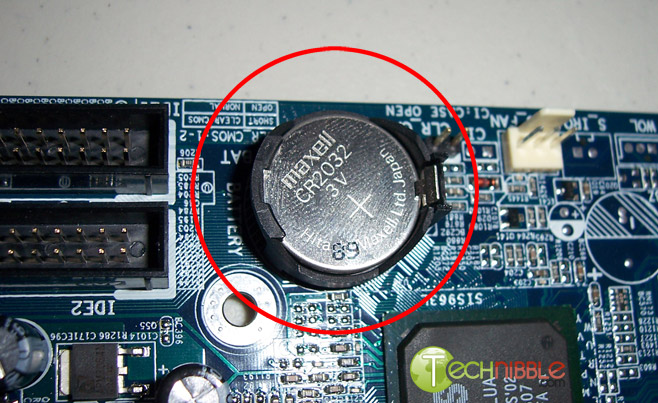
How to Bypass or Remove a BIOS Password by Removing the CMOS Battery:
The simplest way to remove a BIOS password is to simply remove the CMOS battery. A computer will remember its settings and keep the time even when it is turned off and unplugged because these parts are powered by small battery inside the computer called a CMOS battery. If we pull out this battery, the computer will forget alot of its hardware settings, including its BIOS password. This should not be performed on Laptops if you are not experienced working with laptop hardware.
Finding the CMOS BatteryAnyway, open up the computer case using a screw driver and locate the flat, circular and metallic CMOS battery. It should look something like the picture to the right. Some computers have this part standing upright.
Once you have located it, observe how the latches are holding it. There are many different ways to remove a CMOS battery but the most common way on newer computers can be seen in the picture below.

FREE Windows Genuine Advantage Validation v1.9.40.0 FULL VERSION

Cracking Windows Genuine Advantage Notification has always seemed easy for crackers because whenever Microsoft released a newer WGA to counter the old cracks, the crackers gets back to work and normally within a few hours the cracked legitcheckcontrol.dll will be made available publicly.
By using the cracked Windows Genuine Advantage, it allows non-genuine users to use Windows/Microsoft Updates to check for any Windows hotfixes and also downloading any protected file in Microsoft Download Center. Other than that if the non genuine user managed to obtain the installer for Windows Media Player 11 or Microsoft Security Essentials and tries to install, the WGA check will be passed and allowing the user to install.


 Windows Genuine Advantage 1.9.40 crack

[TUTORIAL] Activate Windows 8 and Windows Server 2012 Windows Loader

Windows Loader - Activator for all versions of Windows 8 and Windows Server 2012. The program has an intuitive user interface. When you run the program, click on the Install button and select the version to activate.

 Installation instruction:
1. extract the rar
2. open Windows Loader v.120810.1231 By DOSHA as administrator.
3. select windows version to crack and install
4. enjoy.


DOWNLOAD | Windows Loader v.120810.1231 By DOSHA (3.9MB)


How to CHANGE MAC Address Huawei Wimax BM622i 2011

Written By Admin on Wednesday, April 24, 2013 | 5:57 PM

This guide will show you how to connect again your disconnect Huawei BM622i 2011

eto po ay tut kung pano magchange mac sa bm622i 2011 package..di po ako papansin..try nyo muna bago kayo mag neagtive feedback ok.....ang problem lng dito kahit nka change mac na ako di pa din ngcoconect modem ko..di ko din mapasok admin sa gui..

1st po download nyo to...
DOWNLOAD HERE.

2nd: connect nyo bm622i nyo sa pc

3rd run nyo yung firmware upgrader pero wag nyo po i upgrade..yaan nyo lang nakaopen..

4th: go to>start>run>cmd tpos type nyo telnet then enter

5th: after type nang telnet type nyo " o 192.168.254.1 "(pakialis na lang po ng " "pag magttype)

6th: LOGIN: Firefly PASS: $P4mb1h1r4N4m4nT0!! then enter

7th: ATP>xiugai macdizhi XX:XX:XX:XX:XX:XX (yan po yung mac na ilalagay nyo)

How to CHANGE MAC Address Huawei Wimax BM622i 2011

This guide will show you how to connect again your disconnect Huawei BM622i 2011

1st po download nyo to...
DOWNLOAD HERE
2nd: connect nyo bm622i nyo sa pc
3rd run nyo yung firmware upgrader pero wag nyo po i upgrade..yaan nyo lang nakaopen..
4th: go to>start>run>cmd tpos type nyo telnet then enter
5th: after type nang telnet type nyo o 192.168.254.1

How to CHANGE MAC Address Huawei Wimax BM622i 2010

This guide will show you how to connect again your disconnected Huawei BM622i 2010

ito guys share ko lang sa mga newbies :D
sana makatulong sa inyo.

Login wimax
Passwordwimax820
ATPdiag set macaddr XXXXXXXXXXXX
set Lan mac address success
Lan mac address updated XXXXXXXXXXXX
set Lan Mac address Sucess
Wan mac address updated XXXXXXXXXXXX
ATP diag restore default

paki like na lang po thanks.

LEARN MORE HOW TO CHANGE MAC ADDRESS

How to CHANGE MAC Address Huawei Wimax BM622 2011

This guide will show you how to connect again your disconnect Huawei BM622 2011

        BM622 2011 CHANGE MAC

        1.PLUG YOUR MODEM IN TO THE COMPUTER W8 UNTIL CONNECTED TO YOUR PC
        2.ENABLE MUNA NATIN TELNET SA ADMIN..
        3.OPEN BM622 DECODER Download LINK
        4.OPEN BROWSER TYPE 192.168.1.1 (ENTER) LOGIN: ADMIN PASS: UNG NA GENERATED NG BM622 DECODER
        5.PAG PASOK NA SA ADMIN... PUNTA SA ACL TAPOS CHECK UNG TELNET SA LAN THEN APPLY.. (TELNET NA TAU)
        6.GO TO CMD TYPE TELNET 192.168.1.1 THEN ENTER
        7.LOGIN: Firefly PASS: $P4mb1h1r4N4m4nT0!! then enter
        ATP>display allmacaddr (show base mac )
        Current WAN Mac:XX:XX:XX:XX:XX:XX
 
Copyright © 2011. PinoyXpert - All Rights Reserved
Proudly powered by Blogger